Load balancing Merative Imaging Solutions
Updated on February 3, 2026
•
Published on March 6, 2023
Benefits of load balancing Merative Imaging Solutions
The three main benefits of load balancing medical imaging solutions, such as Picture Archiving and Communication Systems (PACS) and Vendor Neutral Archives (VNA), are:
- High Availability (HA): Load balancing ensures continuous access to critical imaging data by distributing traffic across multiple servers. If one server fails, the load balancer automatically redirects all traffic to the remaining healthy servers (seamless failover), preventing downtime and minimizing disruptions to patient care workflows.
- Enhanced workflow performance: Load balancing optimizes resource usage by intelligently distributing incoming requests (for image storage, retrieval, or viewing) to the least loaded or best-performing server. This prevents server overload, eliminates bottlenecks, supports faster processing of large imaging studies, and improves the overall speed and responsiveness of the system for clinicians.
- Scalability: It allows healthcare organizations to easily add or remove servers to the system without service interruption. This enables the imaging solution to handle growing data volumes and increasing demand (like peak hours or new imaging modalities) in a flexible, cost-effective manner.
About Merative Enterprise Imaging Solutions
Merative helps clients orient information and insights around the people they serve to improve decision making and performance.
Merative’s Enterprise Imaging solutions include:
- iConnect® Access (by Merative): A zero-download, diagnostic quality image and XDS viewer for referring physicians.
- iConnect® Enterprise Archive (by Merative): A vendor neutral archive (VNA) to create an enterprise imaging strategy.
- Merge PACS: An AI-ready workflow platform that simplifies physicians’ reading activities and empowers IT leaders with advanced control of the flow of studies throughout the enterprise.
Merative recommend that multiple iConnect Enterprise Access, iConnect Archive & Merge PACS servers are deployed in a load balanced Cluster.
For high availability, Merative recommend that a load balancer is used to enable administrators to rapidly failover to the secondary iConnect Enterprise Cluster / MergePACS Cluster should the Primary Cluster become unavailable.
Load balanced ports
The following table shows the ports used by iConnect Enterprise Access, iConnect Archive & MergePACS. The load balancer must be configured to listen on the same ports.
| Port | Protocols | System | Use |
|---|---|---|---|
| 12000 | TCP | VNA | DICOM |
| 12100 | TCP | VNA | DICOM Proxy |
| 12200 | TCP | VNA | DICOM Work List |
| 12300 & 12301 | TCP | VNA | VNA Admin |
| 12950 | TCP | VNA | VNA Stream |
| 12800 | TCP | VNA | VNA HL7 |
| 104 | TCP | PACS | DICOM |
| 80,8080,443,8443 | TCP | PACS | HTTP & HTTPS |
| 5222 | TCP | PACS | Instant Messenger |
| 1001 | TCP | PACS | PACS HL7 |
Load balancing deployment concept
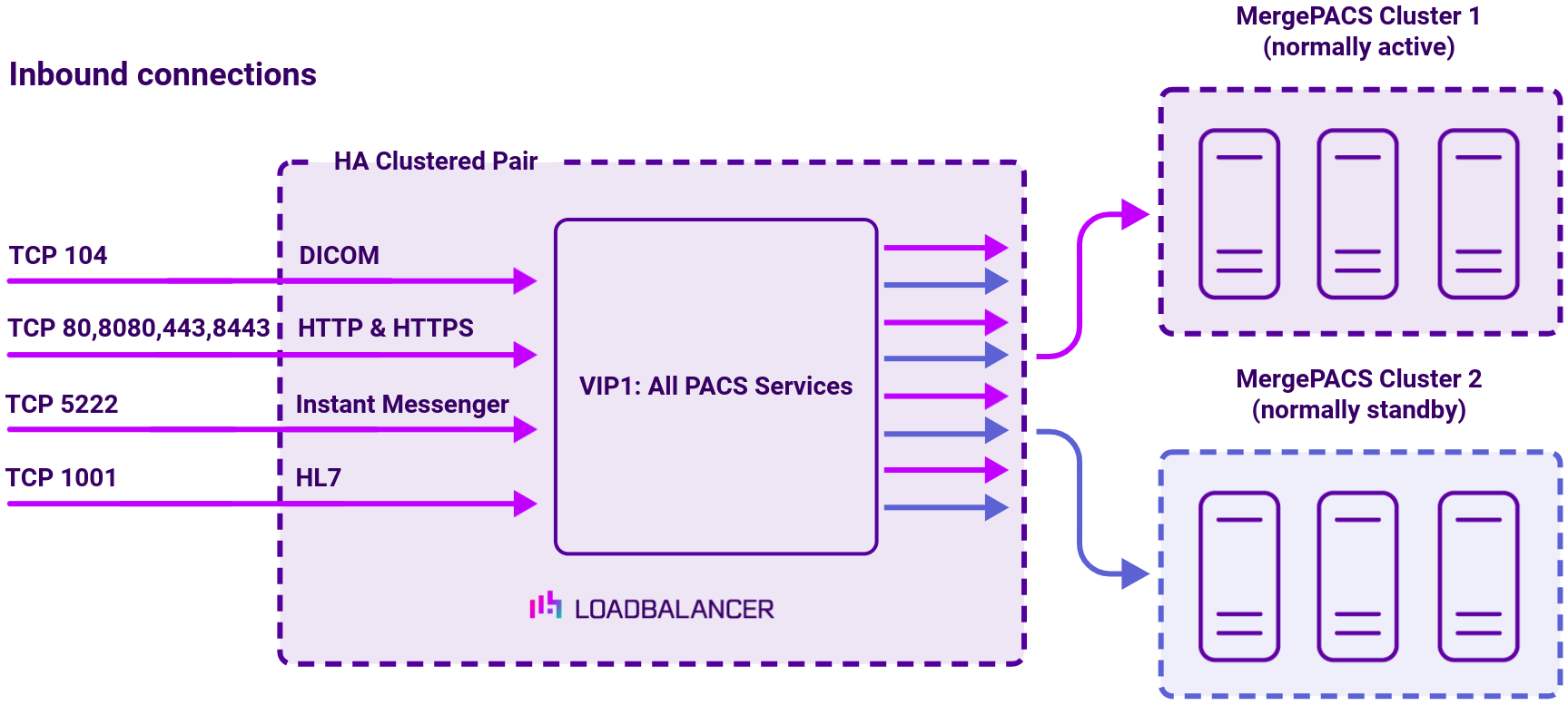
When iConnect Enterprise Archive and/or MergePACS, are deployed with a load balancer, clients connect to the Virtual Services (VIPs) on the load balancer rather than connecting directly to one of the iConnect Enterprise Archive clusters.
These connections are then forwarded to the primary cluster. Should the Primary Cluster become unavailable, the administrator must manually trigger a failover to the Secondary Cluster using the ‘Halt’ feature in the appliance (load balancer) Web User Interface (WebUI).
How to load balance iConnect Access
The load balancer can be deployed in four fundamental ways: Layer 4 DR mode, Layer 4 NAT mode, Layer 4 SNAT mode, and Layer 7 Reverse Proxy (Layer 7 SNAT mode).
For Merative iConnect Access, a Layer 4 DR mode deployment is recommended.
iConnect Access virtual service (VIP) requirements
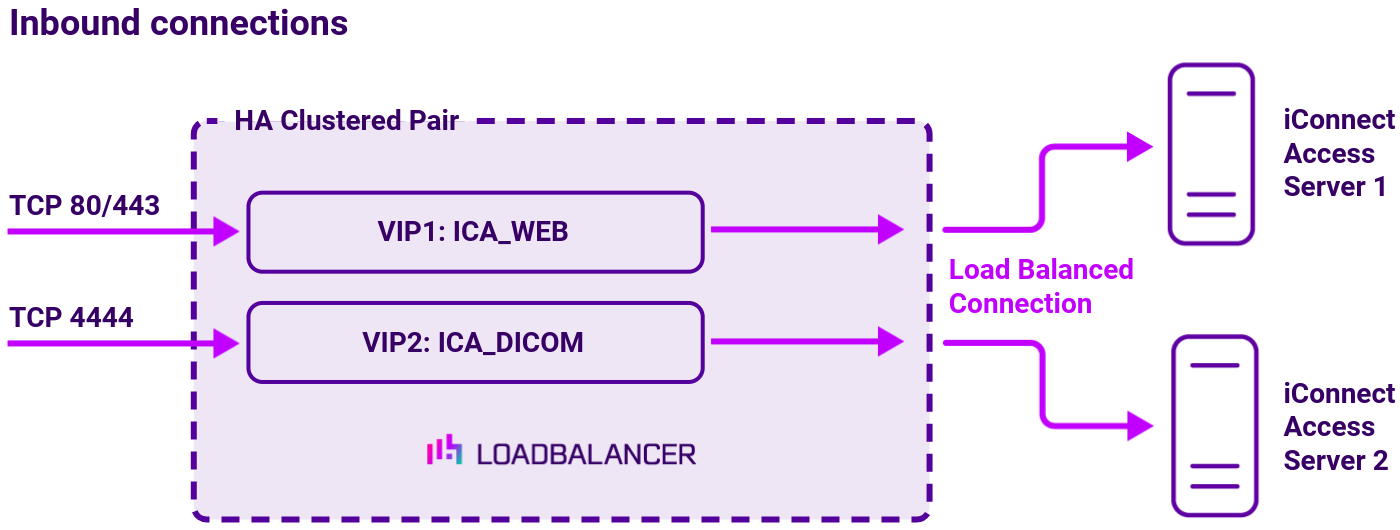
To provide load balancing and HA for iConnect Access, 2 VIPS are required as depicted in the diagram above, these are:
- VIP1 : ICA_WEB
- VIP2 : ICA_DICOM
iConnect Access load balanced ports
The following table shows the ports/services that are load balanced:
| Port | Protocols | Use |
|---|---|---|
| 80 & 443 | TCP | HTTP & HTTPS |
| 4444 | TCP | DICOM |
iConnect Access load balancing deployment concept
When iConnect Access is deployed with the load balancer, clients connect to the Virtual Services (VIPs) on the load balancer rather than connecting directly to one of the iConnect Access Servers. These connections are then load balanced across the iConnect Access Servers to distribute the load according to the load balancing algorithm selected.
How to load balance iConnect Enterprise Archive
The load balancer can be deployed in four fundamental ways: Layer 4 DR mode, Layer 4 NAT mode, Layer 4 SNAT mode, and Layer 7 Reverse Proxy (Layer 7 SNAT mode).
For Merative iConnect Enterprise Archive, a Layer 4 NAT deployment is recommended.
iConnect Enterprise Archive virtual service (VIP) requirements
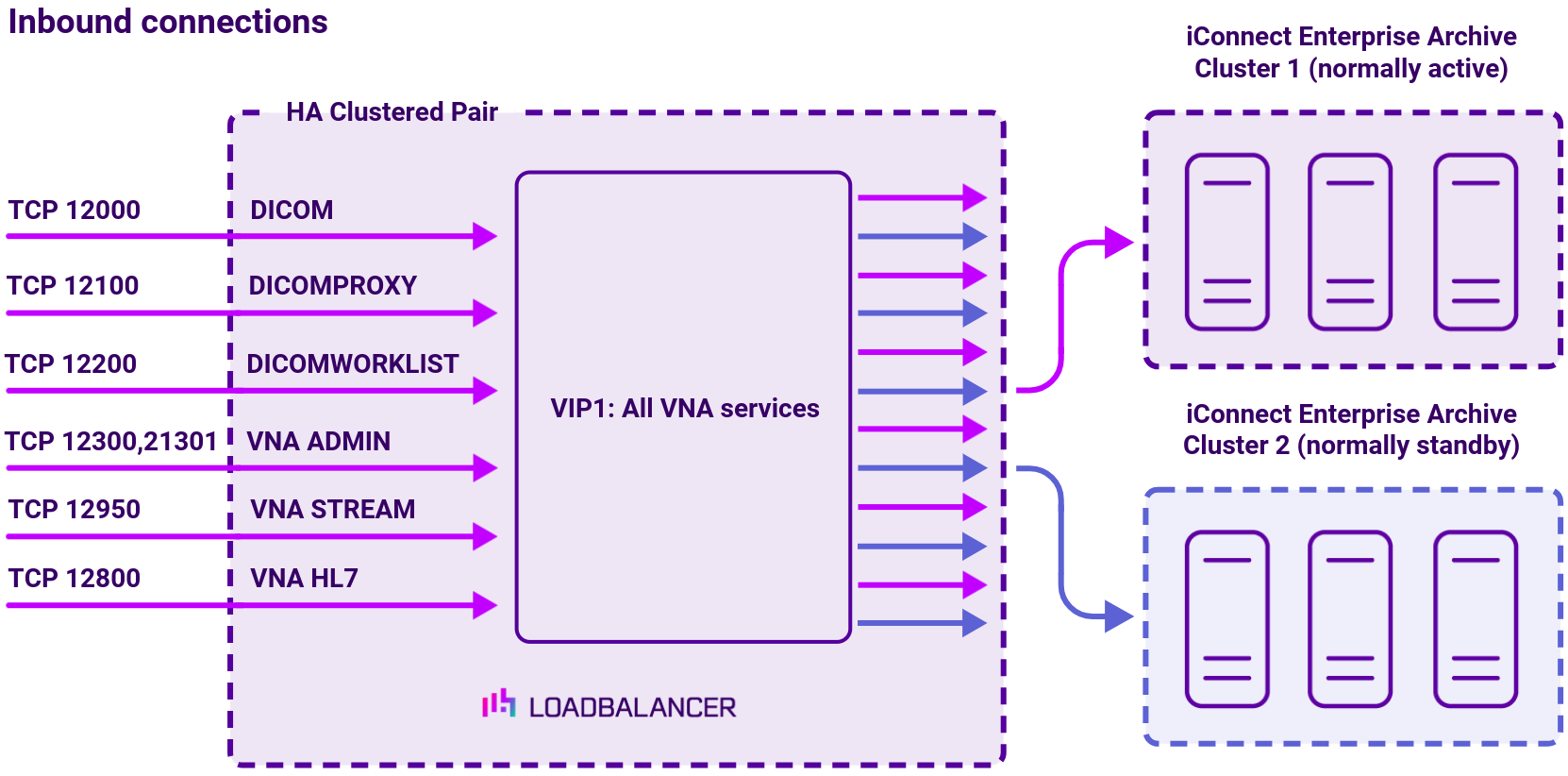
A single multi-port VIP is used that listens on all required ports. The VIP is configured as follows:
- Deployment mode: Layer 4 NAT (Network Address Translation) mode
- Listens on a total of 7 ports as described on the diagram below
- The health-check configuration depends on whether automatic or manual failover is required: 1) for automatic failover an external script is used, the script checks that all 7 ports are available and runs every 30 seconds, if connection to one or more of the ports fails, the health check is deemed to have failed, if there are 10 consecutive health check failures, cluster failover occurs; 2) for manual failover the health check is set to: No checks, always On
- The associated Real Server is configured to be the cluster IP address of the Primary Cluster
- The fallback server is configured to be the cluster IP address of the Secondary Cluster
iConnect Enterprise Archive load balanced ports
The following table shows the ports used by iConnect Enterprise Archive. The load balancer must be configured to listen on the same ports.
| Port(s) | Protocols | Use |
|---|---|---|
| 12000 | TCP | DICOM |
| 12100 | TCP | DICOM Proxy |
| 12200 | TCP | DICOM Work List |
| 12300 & 12301 | TCP | VNA Admin |
| 12950 | TCP | VNA Stream |
| 12800 | TCP | VNA HL7 |
iConnect Enterprise Archive load balancing deployment concept
When iConnect Enterprise Archive is deployed with the load balancer, clients connect to the Virtual Service (VIP) on the load balancer rather than connecting directly to one of the iConnect Enterprise Archive Clusters. Under normal conditions, these connections are then forwarded to the Primary Cluster.
How to load balance Merge PACS
The load balancer can be deployed in four fundamental ways: Layer 4 DR mode, Layer 4 NAT mode, Layer 4 SNAT mode, and Layer 7 Reverse Proxy (Layer 7 SNAT mode).
For Merative PACS, a Layer 4 DR deployment is recommended.
Merge PACS virtual service (VIP) requirements
A single multi-port VIP is used that listens on all required ports. The VIP is configured as follows:
- Deployment mode: Layer 4 DR (Direct Return) mode
- Listens on a total of 7 ports as described on the diagram
- The health-check configuration depends on whether automatic or manual failover is required: 1) for automatic failover an external script is used, the script checks that all 7 ports are available and runs every 30 seconds, if connection to one or more of the ports fails, the health check is deemed to have failed, if there are 10 consecutive health check failures, cluster failover occurs; 2) for manual failover the health check is set to: No checks, always On
- The associated Real Server is configured to be the cluster IP address of the Primary Cluster
- The fallback server is configured to be the cluster IP address of the Secondary Cluster
Merge PACS load balanced ports
The following table shows the ports/services that are load balanced:
| Protocol | Port | Purpose |
|---|---|---|
| TCP | 22 | SSH |
| TCP & UDP | 53 | DNS/GSLB |
| TCP & UDP | 123 | NTP |
| TCP & UDP | 161 | SNMP |
| UDP | 6694 | Heartbeat between Primary & Secondary appliances in HA mode |
| TCP | 7778 | HAProxy persistence table replication |
| TCP | 9000 | Gateway service (Centralized/Portal Management) |
| TCP | 9080 | WebUI – HTTP (disabled by default) |
| TCP | 9081 | Nginx fallback page |
| TCP | 9443 | WebUI – HTTPS |
| TCP | 25565 | Shuttle service (Centralized/Portal Management) |
Merge PACS load balancing deployment concept
When MergePACS is deployed with the load balancer, clients connect to the Virtual Service (VIP) on the load balancer rather than connecting directly to one of the MergePACS Clusters. Under normal conditions, these connections are then forwarded to the Primary Cluster.