
Load balancing Red Hat OpenStack
Updated on November 27, 2025
•
Published on June 30, 2025
Benefits of load balancing OpenStack
Load balancing is crucial for Red Hat OpenStack Platform (RHOSP) deployments in order to ensure the high availability, scalability, and performance of applications and services running within the cloud.
- High availability (HA): Load balancers ensure uninterrupted service by performing health checks and distributing network traffic. They proactively monitor the health of backend servers, so if one goes offline it is temporarily removed from the pool until it recovers, preventing requests from being sent to failing servers. This allows the load balancer to direct incoming traffic across multiple, healthy backend instances of an application or service.
- Scalability: By adding more backend instances as demand grows, load balancing can enable applications and services to be scaled horizontally. This means they can handle more users and requests without performance becoming compromised.
- Performance: Load balancers can reduce latency by distributing traffic evenly, preventing bottlenecks and leading to faster user response times. They also ensure that all available resources are utilized efficiently, preventing server overload or underuse.Different load balancing algorithms, such as round-robin, least connections, and source IP, can be used to optimize distribution based on unique need and use cases.
- Security: Load balancers can enhance security and performance by handling SSL/TLS encryption and decryption, a CPU-intensive task that offloads work from backend servers and centralizes certificate management. This also reduces the attack surface on individual application instances. Load balancers can also provide DDoS protection by absorbing and filtering malicious traffic before it can reach and overwhelm the backend servers.
- Simplified operations: A load balancer simplifies the management of backend infrastructure by offering a single access point, which hides the complexity of individual servers from users and applications. This also streamlines maintenance, allowing updates and offline maintenance to be performed on a specific backend instance without disrupting the availability of the service as a whole.
About Red Hat OpenStack
Red Hat OpenStack (RHOSP) is an open source platform that uses pooled virtual resources to build and manage private and public clouds.
This cloud computing platform virtualizes resources from industry-standard hardware, organizes them into clouds, and manages them so users can access what they need—when they need it.
Why Loadbalancer.org for Red Hat OpenStack?
Loadbalancer’s intuitive Enterprise Application Delivery Controller (ADC) is designed to save time and money with a clever, not complex, WebUI.
Easily configure, deploy, manage, and maintain our Enterprise load balancer, reducing complexity and the risk of human error. For a difference you can see in just minutes.
And with WAF and GSLB included straight out-of-the-box, there’s no hidden costs, so the prices you see on our website are fully transparent.
More on what’s possible with Loadbalancer.org
How to load balance Red Hat OpenStack
The load balancer can be deployed in four fundamental ways: Layer 4 DR mode, Layer 4 NAT mode, Layer 4 SNAT mode, and Layer 7 Reverse Proxy (Layer 7 SNAT mode).
For Red Hat OpenStack, Layer 7 Reverse Proxy is recommended.
Virtual service (VIP) requirements
To provide load balancing and HA for Red Hat OpenStack, the following VIPs are required:
| VIP | Mode | Port(s) | Persistence Mode |
|---|---|---|---|
| aodh | L7 Reverse Proxy (TCP) | 8042 | None |
| ceilometer | L7 Reverse Proxy (TCP) | 8777 | None |
| cinder | L7 Reverse Proxy (TCP) | 8776 | None |
| glance_api | L7 Reverse Proxy (TCP) | 9292 | None |
| glance_registry | L7 Reverse Proxy (TCP) | 9191 | None |
| gnocchi | L7 Reverse Proxy (TCP) | 8041 | None |
| heat_api | L7 Reverse Proxy (TCP) | 8004 | None |
| heat_cfn | L7 Reverse Proxy (TCP) | 8000 | None |
| heat_cloudwatch | L7 Reverse Proxy (TCP) | 8003 | None |
| horizon | L7 Reverse Proxy (HTTP) | 80 | HTTP Cookie |
| keystone_admin | L7 Reverse Proxy (TCP) | 35357 | None |
| keystone_admin_shh | L7 Reverse Proxy (TCP) | 22 | None |
| keystone_public | L7 Reverse Proxy (TCP) | 5000 | None |
| mysql | L7 Reverse Proxy (TCP) | 3306 | Last Successful |
| neutron | L7 Reverse Proxy (TCP) | 9696 | None |
| nova_ec2 | L7 Reverse Proxy (TCP) | 8773 | None |
| nova_metadata | L7 Reverse Proxy (TCP) | 8775 | None |
| nova_novncproxy | L7 Reverse Proxy (TCP) | 6080 | Source IP |
| nova_osapi | L7 Reverse Proxy (TCP) | 8774 | None |
| nova_placement | L7 Reverse Proxy (TCP) | 8778 | None |
| panko | L7 Reverse Proxy (TCP) | 8779 | None |
| redis | L7 Reverse Proxy (TCP) | 6379 | Last Successful |
| swift_proxy_server | L7 Reverse Proxy (TCP) | 8080 | None |
Load balancing deployment concept
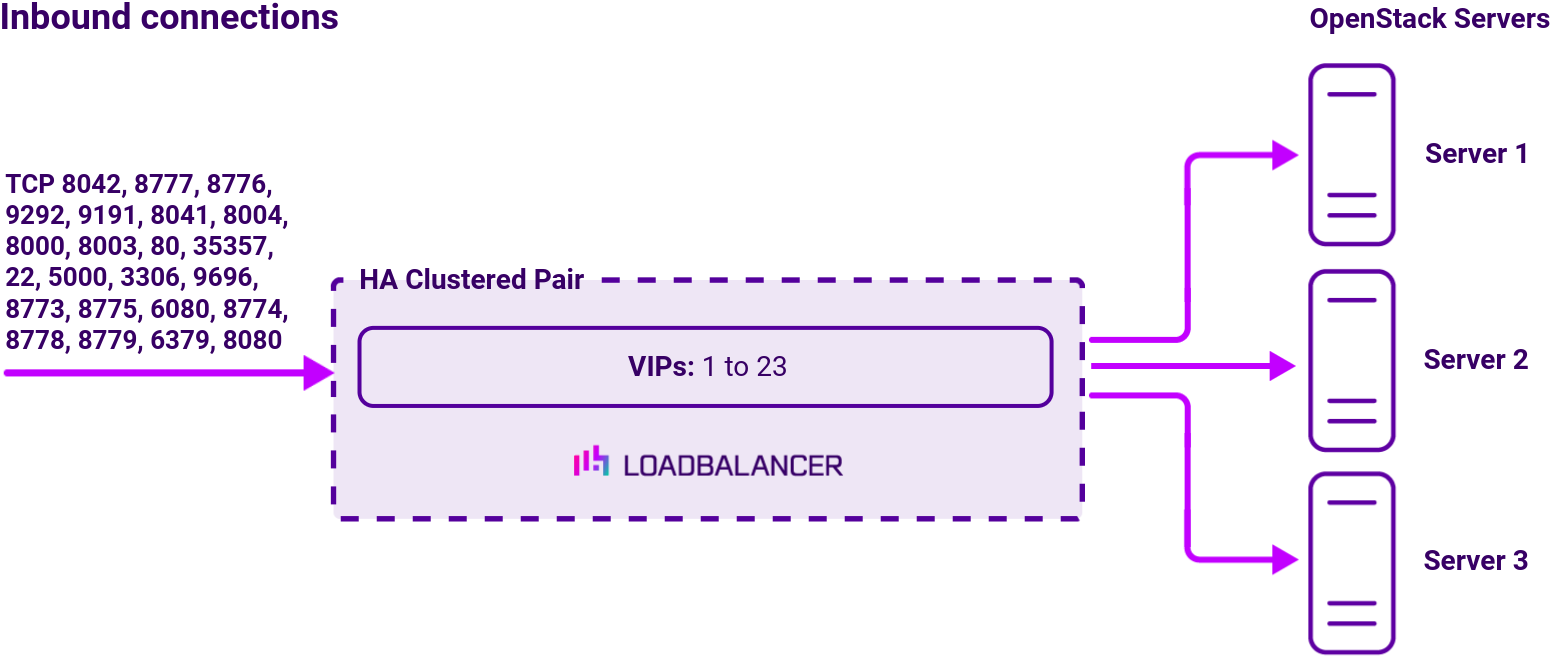
Once the load balancer is deployed, clients connect to the Virtual Services (VIPs) rather than connecting directly to one of the Red Hat OpenStack servers. These connections are then load balanced across the OpenStack servers to distribute the load according to the load balancing algorithm selected.
Note
The load balancer can be deployed as a single unit, although Loadbalancer.org recommends a clustered pair for resilience & high availability. Please refer to the section Configuring HA Adding a Secondary Appliance in the administration manual for more details on configuring a clustered pair.
Topology
Layer 7 Reverse Proxy can be deployed using either a one-arm or two-arm configuration. For two-arm deployments, eth1 is typically used for client side connections and eth0 is used for Real Server connections, although this is not mandatory since any interface can be used for any purpose. For more on one and two-arm topology see Topologies & Load Balancing Methods.
About Layer 7 Reverse Proxy
Layer 7 Reverse Proxy uses a proxy (HAProxy) at the application layer. Inbound requests are terminated on the load balancer and HAProxy generates a new corresponding request to the chosen Real Server. As a result, Layer 7 is typically not as fast as the Layer 4 methods. Layer 7 is typically chosen when either enhanced options such as SSL termination, cookie based persistence, URL rewriting, header insertion/deletion etc. are required, or when the network topology prohibits the use of the Layer 4 methods. The image below shows an example network diagram for this mode.
The image below shows an example Layer 7 Reverse Proxy network diagram:
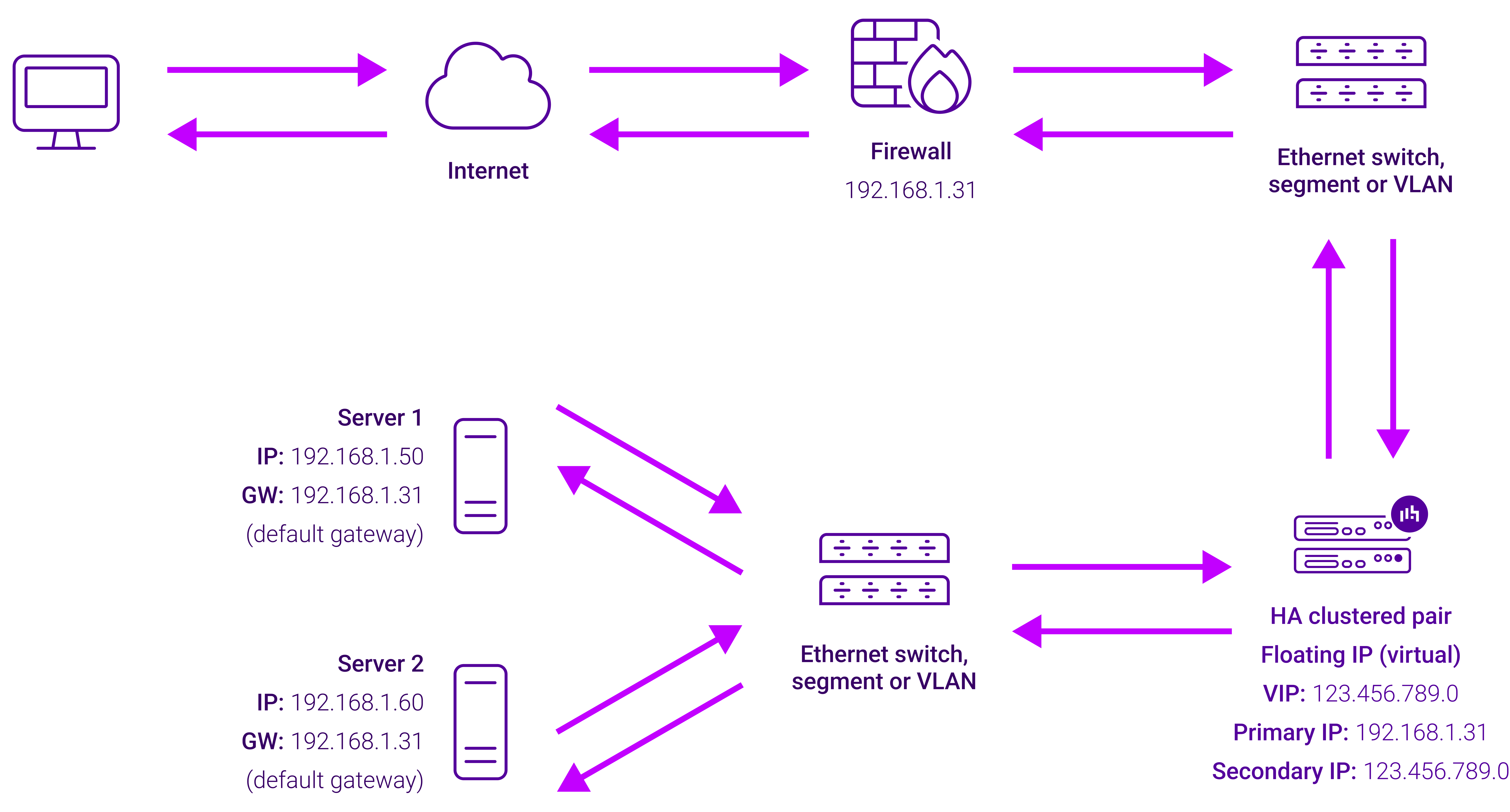
Because Layer 7 Reverse Proxy is a full proxy, Real Servers in the cluster can be on any accessible network including across the Internet or WAN.
Layer 7 Reverse Proxy is not transparent by default, i.e. the Real Servers will not see the source IP address of the client, they will see the load balancer’s own IP address by default, or any other local appliance IP address if preferred (e.g. the VIP address). This can be configured per Layer 7 VIP. If required, the load balancer can be configured to provide the actual client IP address to the Real Servers in 2 ways. Either by inserting a header that contains the client’s source IP address, or by modifying the Source Address field of the IP packets and replacing the IP address of the load balancer with the IP address of the client. For more information on these methods please refer to Transparency at Layer 7.
Requires no mode-specific configuration changes to the load balanced Real Servers.
Port translation is possible with Layer 7 Reverse Proxy, e.g. VIP:80 → RIP:8080 is supported.
You should not use the same RIP:PORT combination for Layer 7 Reverse Proxy VIPs and Layer 4 SNAT mode VIPs because the required firewall rules conflict.